Pick a giveaway winner in front of your audience and the question answers itself. Pick one quietly and you'll spend the next week answering DMs, some of them with screenshots of their own entry attached as evidence.
So the method matters twice. Once for giving every entry a genuinely equal chance, and once for being able to show it. The whole process fits in five steps, and every tool involved is free.
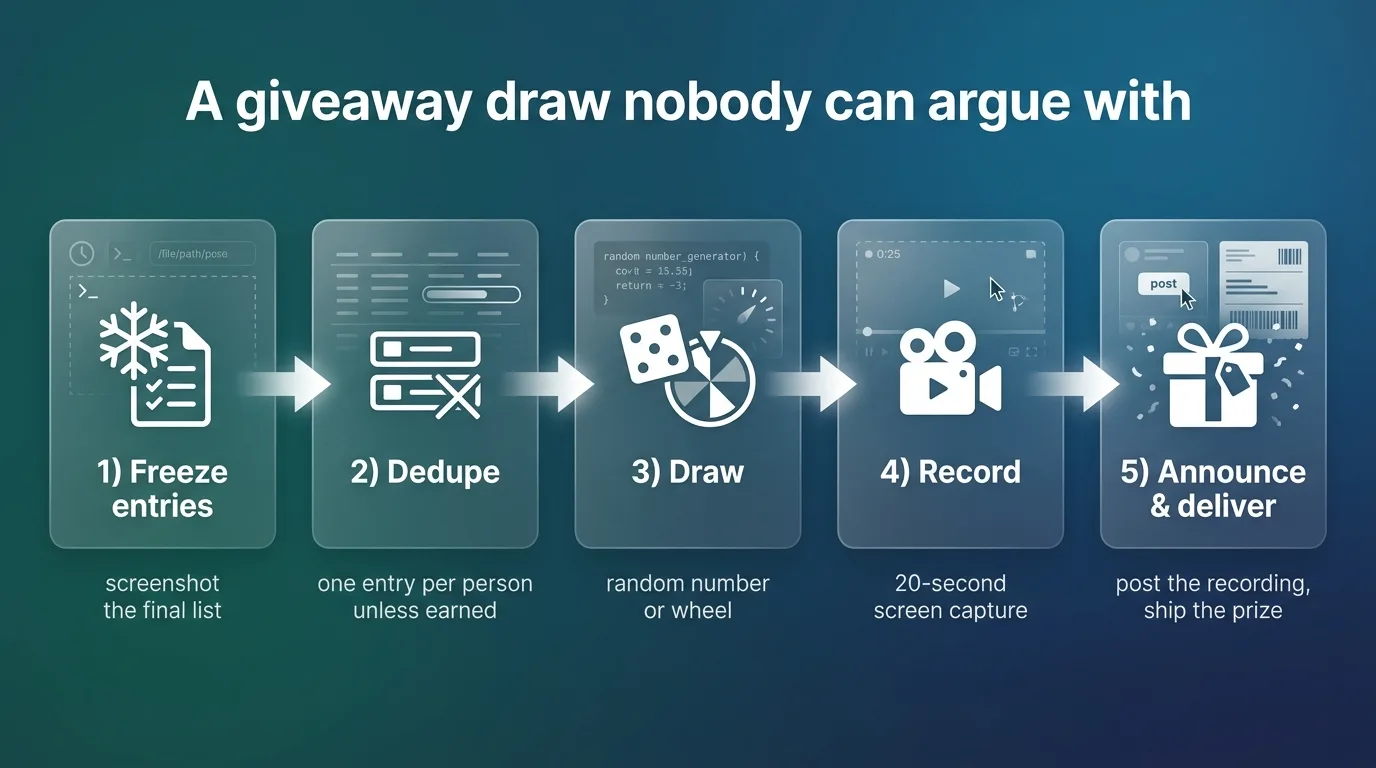
Freeze the entry list before anything else
Entries stop when the rules said they'd stop. Screenshot the final comment thread, or export it, or copy the names into a sheet, and that snapshot becomes the pool.
Late entries go in the next giveaway. Deleted comments stay in if they were there at the deadline. Deciding all of this after seeing who entered is where fairness quietly dies, so decide it now, while the list is just a list.
If the same person entered twice under slightly different capitalization, collapse them with the duplicate line remover before drawing. Unless your rules granted bonus entries, in which case the duplicates are the bonus, leave them in on purpose.
Method 1. Number the entries and draw one
Still what I'd use for anything under a few hundred entries.
- Fix the order. Comment order works, so does a spreadsheet sorted by entry time.
- Open the random number generator and set decimal places to 0.
- Set Quantity to 1.
- Minimum 1, maximum your entry count. Both ends are inclusive, so with 250 entries, entry 250 can win.
- Generate once. That number's entry wins.
The number comes from your browser's crypto source (crypto.getRandomValues), unpredictable in the way a fair draw needs, and nothing about your draw leaves your device.
Generate once means once. Rerolling until a "better" name comes up is the exact thing the recording exists to prove you didn't do.
Method 2. Paste the names into a list picker
Skips the numbering step entirely.
Drop every name into the Random Choice Generator, one per line, duplicates off, and pick. For multiple prizes, draw the grand prize first, remove that winner, draw again. Nobody should win twice unless your rules said they could.
Method 3. Spin a wheel on camera
For live draws, visible randomness beats invisible randomness. A number appearing in a box is trustworthy; a wheel slowing down in front of 80 viewers feels trustworthy, and for your audience the feeling is most of the point.
Load the names into the random wheel, share your screen, spin. The suspense is free content, honestly.
Keep the entry list on screen before the spin so viewers can find their own name. An off-screen wheel invites exactly the suspicion you're trying to avoid.
How to pick a winner for an Instagram giveaway
The entries are comments, so the job is getting comments into one of the methods above.
Comment picker services (AppSorteos, Simpliers, Wask, and a dozen others) fetch the comment list from a post URL and draw for you. Before trusting one, check two things. Whether it demands your Instagram login, because fetching public comments shouldn't need your password. And how it handles serial commenters, since one person can leave 40 comments,, and your rules should say whether that's 40 entries or one.
The manual route works at any scale that fits in an afternoon. Copy the comments out, paste the usernames into the list picker, draw. I helped run a 300-comment draw for a friend's candle shop in November, and collecting the entries took about forty minutes against ninety seconds for the actual draw. Budget accordingly.
Two Instagram-specific rules people miss. Verify the drawn winner met the entry requirements (following, tagging) before announcing, and redraw if they didn't. And Instagram's promotion guidelines require boilerplate acknowledging the giveaway isn't sponsored by Instagram. Small print, real requirement.
YouTube and Facebook work the same way, with their own comment pickers, and the same caveats apply. For a giveaway running on two platforms at once, merge everything into one spreadsheet first so a person who entered on both doesn't get counted as two people.
Running the draw so nobody doubts it
A fair pick can still look unfair if it happens in the dark. Cheap fixes, all of them.
- Write the rules before the first entry exists. Who's eligible, how entries are earned, when it closes, when you draw. Changing rules mid-giveaway reads as rigging even when it isn't.
- Screen-record the draw. Twenty seconds. Post it with the announcement.
- Give unclaimed prizes a stated deadline ("48 hours to reply, then we redraw") and stick to it.
- Deliver the prize promptly and post that it arrived. A visible history of past winners holding what they won does more for next month's entry count than any hashtag.
Never seed the pool with friends and never draw until a favored name comes up. Where entries cost anything of value, rigging a draw crosses into fraud in plenty of jurisdictions, and one leaked screenshot ends the trust that made the giveaway worth running. Keeping your word to a few hundred strangers is the entire product here.
Announcing the winner (and the scam that follows every giveaway)
Tag the winner once in a public post with the recording attached, then let them come to you. Repeated public pressure on someone who hasn't replied yet reads as desperate, and the 48-hour redraw rule handles silence anyway.
Within hours of any decent-sized giveaway, fake accounts with your name and profile picture will DM entrants claiming they won and asking for a "shipping fee" or card details. You didn't send those, but your entrants don't know that. Say so in the announcement, something like "we will never DM you first or ask for payment," and you'll spare a few of your most trusting followers a genuinely bad week. It costs one sentence.
If you're still designing the giveaway itself, prizes and entry mechanics are covered in the Instagram giveaway ideas guide.
FAQs
What's the fairest way to pick a giveaway winner? Any method above, applied to a frozen list, with a recording. The randomness is the easy part; the paper trail is what makes it fair in your audience's eyes.
Can I use these for a paid raffle? If money changed hands for entries you're likely in regulated-lottery territory, which varies by state and country. Everything here is built for free promotional giveaways.
How do I pick multiple winners? Draw without replacement. List picker with duplicates off, or redraw any repeated number and say so in the recording.
Someone deleted their comment after the deadline. Do they still count? Whatever your written rules say. Silent rules mean the frozen snapshot decides, and deletions after the freeze don't matter.
How long should the giveaway run before the draw? Five to seven days sits well for most audiences. Shorter and half your followers never see it; much longer and the early entrants forget they entered, which shows up as winners who never claim.
Do comment pickers see every comment? Mostly, though some miss replies-to-comments or hit API limits on huge posts. If the picker's count looks short against the post's comment counter, export manually and draw from the full list.