Fix repeated text without hunting through every line
A company name left unchanged in paragraph 18 is the kind of tiny error that survives a manual edit. Paste the draft into the text replacer, enter the old wording once, and every matching occurrence changes in the live result.
The basic job takes three steps.
- Paste or type the source text.
- Put the old text in Find this, then enter the new wording beside it.
- Read the result, check the replacement count, and copy or download the finished text.
Leave Replace it with empty when the matched text should be deleted. There is no Run button to miss. The result and match counts change while you type.
Need to make replacements directly inside a website, form, or online editor? The Text Replacer for Chrome works on live pages. This web tool is for a block of text or a text-based file you bring here.
A three-rule edit, tested
The built-in message template contains {{name}} twice, plus one order number and one shipping date. Three literal rules produce four replacements because the name appears in two places.
Hands-on check, August 6, 2026. The template was run through the current tool in Chrome. It reported four replacements and produced
Hi Sarah, order#8412, andMonday, July 6in the right positions. An invalid regex was also tested; the rule showed an inline error and left the source text unchanged.
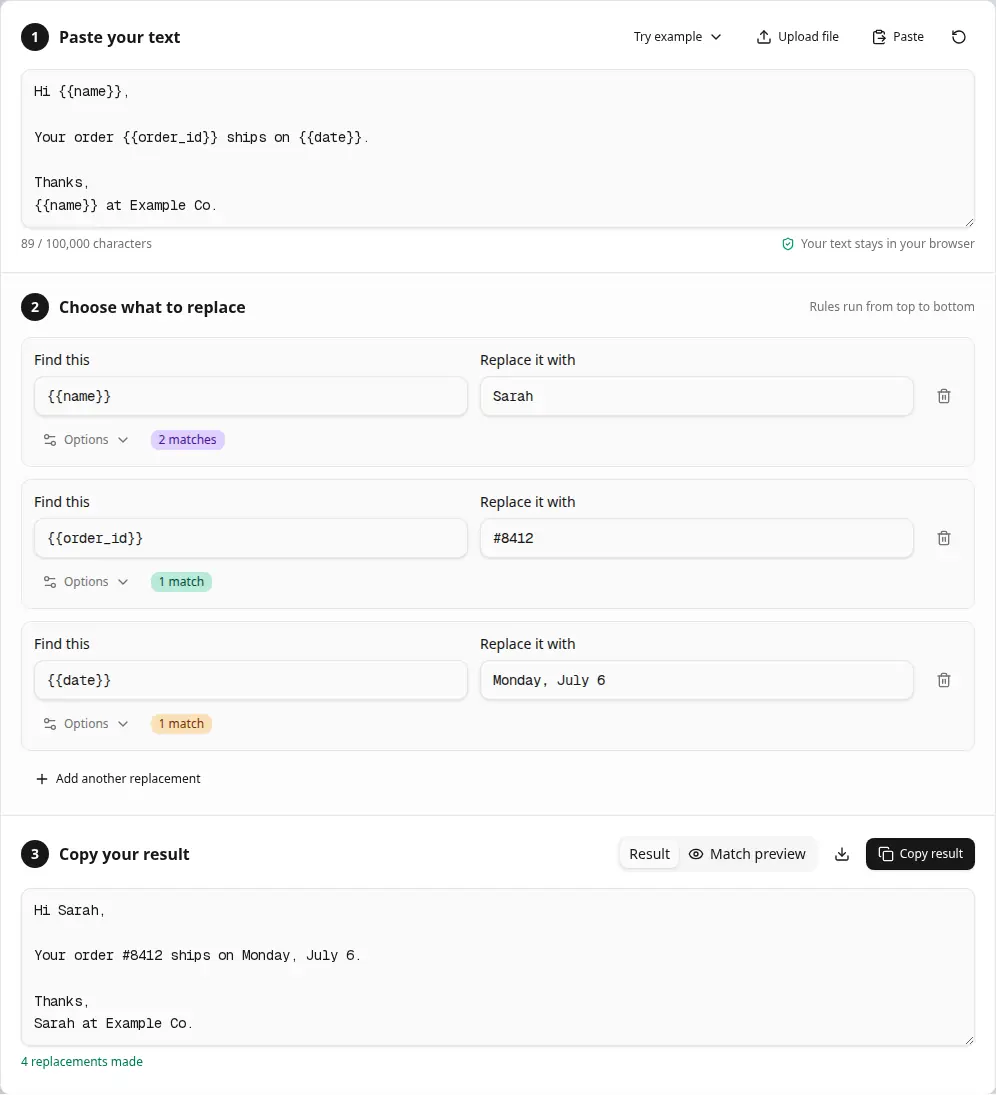
The same {{name}} rule lands twice. The other two rules report one match each.
The colored counts are useful when two placeholders look nearly identical. A missing underscore in {{order_id}} shows up as zero matches before the result is copied.
How to replace text online
Start in literal mode. It treats punctuation, brackets, dollar signs, and other special characters as ordinary text.
- Paste up to 100,000 characters into Paste your text. The Paste button asks the browser for clipboard access, and Upload file reads a text-based file from your device.
- Enter the exact word, phrase, or character sequence under Find this.
- Type the replacement. An empty field deletes every match.
- Open Options only when you need case-sensitive matching, whole words, or a regular expression.
- Check the count beside the rule. Switch to Match preview when a short search could hit text you meant to keep.
- Add another replacement for a second change. Rules run from top to bottom.
- Use Copy result or download
replaced.txt.
For an ordinary typo, every option can stay off. That is the calmer choice, at least for most prose edits. Search for teh, replace it with the, then glance at the preview before the copy leaves this page.
Choose the matching option that fits the text
| Setting | Use it when |
|---|---|
| No options | Change a literal string everywhere, regardless of letter case |
| Match case | Keep ID separate from id and require capitalization to agree |
| Whole words only | Change cat while preserving category |
| Use regular expressions | Match dates, URLs, numbers, or repeated spacing with a JavaScript regex pattern |
Case matching is off by default, so red also finds Red and RED. The replacement is inserted exactly as written. Replacing those matches with blue produces blue each time; the original capitalization is not preserved.
Whole-word mode is helpful for English words, identifiers, and numbers. It uses JavaScript's \b boundary behavior. Underscores and digits count as word characters, while some non-Latin scripts need a purpose-built regex instead.
All occurrences are replaced. The page does not have a Replace first control, fuzzy matching, or automatic spelling correction.
Multiple replacements and rule order
Each rule receives the output of the rule above it. That makes a rule stack useful for templates, editorial cleanup, and small data conversions. But order deserves a quick look.
| Stage | Text |
|---|---|
| Original | cat |
Rule 1, replace cat with dog | dog |
Rule 2, replace dog with fox | fox |
The final result is fox. Reversing the two rules leaves dog because the first rule cannot find a word that has not been created yet.
Per-rule counts follow that sequential output. The colored preview stays anchored to the original pasted text. In the example above, it can highlight cat; it cannot color the temporary dog because dog was absent from the source. That detail is easy to overlook (especially with five or six cleanup rules stacked together).
There is no fixed rule count in the interface. Very large stacks still depend on the memory and speed of the browser, so split a sprawling transformation into smaller reviewed batches when the text matters.
Text find and replace examples
Patterns marked regex require Use regular expressions. Literal recipes work with the default settings.
- Remove web addresses with
https?://\S+. Leave the replacement empty and use regex. - Runs of spaces. Find
{2,}, replace with one space, then enable regex. - Trailing spaces at the end of each line match
+$in regex mode. Replace them with an empty field. - Find
\n{2,}and replace with\nto collapse blank lines. - Curly double quotes use
[“”]as the regex pattern and"as the replacement. - Curly apostrophes need
[‘’]. Replace them with'. - Convert US dates with
(\d{2})/(\d{2})/(\d{4})and$3-$1-$2in regex mode. - CSV commas to semicolons. Find
,and replace with;in literal mode. - A tab is
\tin regex. Replace it with,for a simple TSV-to-CSV change. - Put quotation marks around nonempty lines with
^(.+)$and"$1". - Find
^and replace with>to add a quote marker at the start of every line. - Markdown bold markers are literal
**. Leave the replacement empty.
The date recipe uses capture groups. 04/07/2026 becomes 2026-04-07, while 12/25/2026 becomes 2026-12-25. That exact pair was checked in the tool during this revision.
A curly apostrophe can hide in a copied press release and look ordinary at 14 pixels. Searching for a straight ' will miss the mark in director’s. The quote recipes handle both shapes without changing the letters around them.
Regex replacement without guesswork
Regular expressions describe a pattern instead of one fixed string. Textavia uses the browser's JavaScript regex engine with global and multiline matching. MDN's regular expression guide is a useful reference when a pattern grows beyond the examples below.
| Pattern | What it matches |
|---|---|
\d+ | One or more digits |
\s+ | A run of spaces, tabs, or line breaks |
[A-Z]{2,4} | Two to four uppercase ASCII letters when Match case is on |
\bcat\b | The standalone word cat |
^(.*)$ | One captured line, including an empty line |
(red|blue) | Either word, saved as capture group 1 |
https?://\S+ | An HTTP or HTTPS address up to the next whitespace character |
In the replacement field, $1 through $99 refer to capture groups. $& inserts the complete match. Write $$ for a literal dollar sign in regex mode. The browser follows the replacement rules documented for JavaScript String.replace().
Literal mode handles dollar signs differently. Replacing price with $5 inserts those two characters without asking you to escape anything.
The ^ and $ anchors apply to every line because multiline matching is always enabled. A dot does not cross a line break. Use [\s\S] when one match must span several lines.
Zero-width matches such as ^ can add text at a position, though there is no character for the preview to color. The count and final result still update.
When a match looks wrong
- Searching for
catchanges the first three letters ofcategory. Turn on Whole words only, then check the preview again. - Zero matches. Look for a curly quote, a non-breaking space, or a different dash character. A non-breaking space between
10andkglooks like an ordinary space and still breaks a literal search. - An invalid regex shows the browser engine's message beneath that rule. The broken rule is skipped, while valid rules continue in order.
- Greedy patterns can swallow more text than expected.
".*"reaches from the first quote to the last one on a line;".*?"stops at the nearest closing quote. - If a later rule reports an unexpected count, inspect the rule above it. Earlier replacements may have created new matches.
For stubborn pasted formatting, run the source through the plain text converter or text cleaner, then return here. The regex tester gives a pattern more room when it needs careful debugging.
File support, limits, and output
| Detail | Current behavior |
|---|---|
| Text length | Up to 100,000 characters |
| File picker | .txt, .csv, .md, .json, .xml, .html, .css, .js, .ts, and browser-recognized text files |
| Replacement scope | Every match for each enabled rule |
| Result | Read-only text that updates as the input or rules change |
| Match preview | Available when the total input is 20,000 characters or fewer |
| Highlight count | Shows the first 300 non-overlapping matches; the full result still processes every match |
| Download | UTF-8 plain text named replaced.txt |
Uploaded files are read as text. Word documents, PDFs, spreadsheets, fonts, colors, and layout are not preserved. Convert the source to plain text first when formatting belongs to the original file.
The tool does not fetch a URL, edit the file in place, or save a replacement history. Copy or download the result before closing the tab.
Privacy in practical terms
Matching and replacement run in the current browser tab. Pasted text and uploaded file contents are not sent to Textavia's server for processing.
The analytics hooks record action names and numerical details such as input length, rule count, and replacement count. They do not include the source text, Find values, replacement strings, or downloaded result. The privacy policy explains the site's broader analytics and advertising practices.
Clipboard reading happens only after Paste is pressed and the browser allows access. File reading begins after a file is chosen. Local processing still depends on the device and browser being trustworthy, which matters when the source contains passwords, private keys, medical notes, or unreleased business material.
Related text tools
- Remove line breaks before matching a phrase that was split across copied lines.
- Delete a known set of symbols with the number remover.